The conversation appears live
During the consultation you see the transcript building up as you talk, with medical terminology and automatic speaker recognition. You don’t have to type anything or listen back afterwards.
Voice-driven documentation
You hold the conversation, ScribeChat writes along and delivers a report in your own template.
ScribeChat recreated in the browser, modelled on the portal.
During the consultation you see the transcript building up as you talk, with medical terminology and automatic speaker recognition. You don’t have to type anything or listen back afterwards.
From the same conversation you create a SOAP report, an intake report and a feedback report. Each time, you choose which report type you need.
With speaker recognition, ScribeChat keeps track of who says what. You set the number of speakers yourself, or let it be determined automatically.
ScribeChat in practice for GPs , Mental healthcare and Physiotherapy , or see our pricing .
Real-time translation
Hold a conversation with someone who doesn’t speak your language, without needing an interpreter.
Добрий день, дякую, що прийняли мене.
Good afternoon, thank you for making time for me.
Of course. What’s bothering you?
Звичайно. На що ви скаржитеся?
Болить праве плече, особливо вночі.
My right shoulder hurts, especially at night.
Tolkchat can make mistakes. Check important information.
TolkChat recreated in the browser, modelled on the portal.
You speak your language, the other person speaks theirs. Each turn appears side by side: what was said and what it means.
Where generic translation tools stumble over medical terms, TolkChat is tuned to them specifically. And the conversation stays within the secure environment.
Afterwards, you turn the translated conversation into a report just as easily as a regular consultation.
TolkChat in practice for Mental healthcare , GPs and Occupational health services , or see our pricing .
Data-secure AI chat
An AI chat just like you’re used to, but within an environment that meets healthcare standards.
What would you like to report?
Type an instruction or choose a template
WellcomChat uses AI to formulate answers and can make mistakes.
WellcomChat recreated in the browser, modelled on the portal.
Ask for a referral letter, a feedback report or an email to the occupational physician. You get a draft that you only need to check.
Add a previous conversation, a file, a recording or plain text as a source. The answer is then based on the actual situation, not on a generic example.
Your data does not leave the secure environment and is not used to train AI models.
WellcomChat in practice for GPs , Occupational health services and Mental healthcare , or see our pricing .
Your own templates
Decide for yourself what your reports look like, down to the sentence.
Summarise the complaints in short sentences, in medical language.
Template Studio recreated in the browser, modelled on the portal.
A template consists of sections. For each section, you write in plain language what it should contain, and in what style.
Test your template on a real conversation before you use it. If you see something that could be better, you adjust the instruction and test again.
Share a template with colleagues or with the whole organisation, so that everyone reports in the same way. You stay in charge of it.
Template Studio in practice for Mental healthcare , Physiotherapy and Occupational health services , or see our pricing .
Administrative assistant
Forms that fill themselves in based on what’s already in your records.
Final evaluation UWV
Employee
Initials Surname Birth nameTaskFlow recreated in the browser, modelled on the portal.
Choose the form type, point to your sources and TaskFlow fills in the fields. All you do is check what’s there.
A previous conversation, a PDF, an audio recording or text you paste. You combine several sources in one form.
A progress bar shows how much of the form has been filled in, so you know exactly where you still need to add something.
TaskFlow in practice for Occupational health services and GPs , or see our pricing .
Wellcom works in the browser and as a web app. Handy at someone’s home, away from the office or with TolkChat in the middle of the table.
Open Wellcom as a web app and use your phone’s microphone.
The conversation is waiting in your portal. Review the report.
Wellcom Connect fills in the record in one go.
Through the Wellcom Connect browser extension, the platform connects to virtually any web-based EHR. No implementation project, no waiting time.
Already using another tool? Here’s how to switch
And more on request. With the Wellcom Connect extension, Wellcom works with almost any web-based EHR.
Wellcom and Medicore are working together to make AI-assisted documentation directly available in the consulting room.
Read more
Healthcare organisations that use Nedap ONS can now activate the Wellcom integration themselves within their familiar working environment.
Read more
Wellcom and PractiPlan are making voice-driven documentation available within the familiar PractiPlan environment.
Read more
Wellcom is fully available in Bricks Huisarts, so GPs can use voice-driven documentation from within their own GP information system.
Read more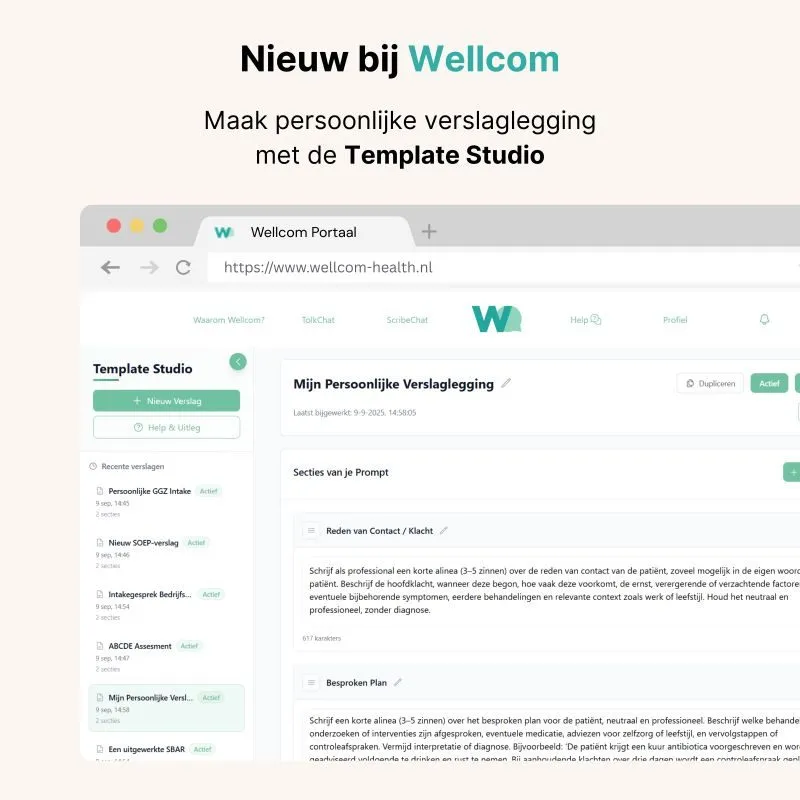
With Template Studio, you put together your own report templates in a few steps, from intake interview to SOAP note.
Read moreSchedule a short introductory call in which we discuss your questions and explore the context of your organisation. Informal and without obligation.
Prefer to pick a time straight away? Book a demo in the calendar right away →